PlayStation Buying Guide
The PS5 Pro vs PS5 decision is not just about which console is more powerful. It is about whether you will actually notice the difference on your screen, whether the games you play take advantage of the Pro, and whether those improvements matter enough to justify choosing it. Both consoles play the same core PS5 game library, but the visual and performance gains vary by game.
Quick verdict
Choose the standard PS5 if you want to play current PlayStation games without paying extra mainly for visual upgrades. Choose the PS5 Pro if you have a capable 4K TV, notice image-quality differences, and regularly play games with a dedicated PS5 Pro Enhanced mode.
The Pro is not a fix for slow internet, high ping, or every performance issue. Its biggest advantages are graphics-related, and the benefits vary by game.
PlayStation 5 Console (PS5)
Disc Edition (model CFI-1215A01X in the supplied listing), with a disc drive and 1TB of listed storage.
PlayStation 5 Pro
2TB SSD with PSSR and advanced ray-tracing features in supported games. Compatible disc drive sold separately.
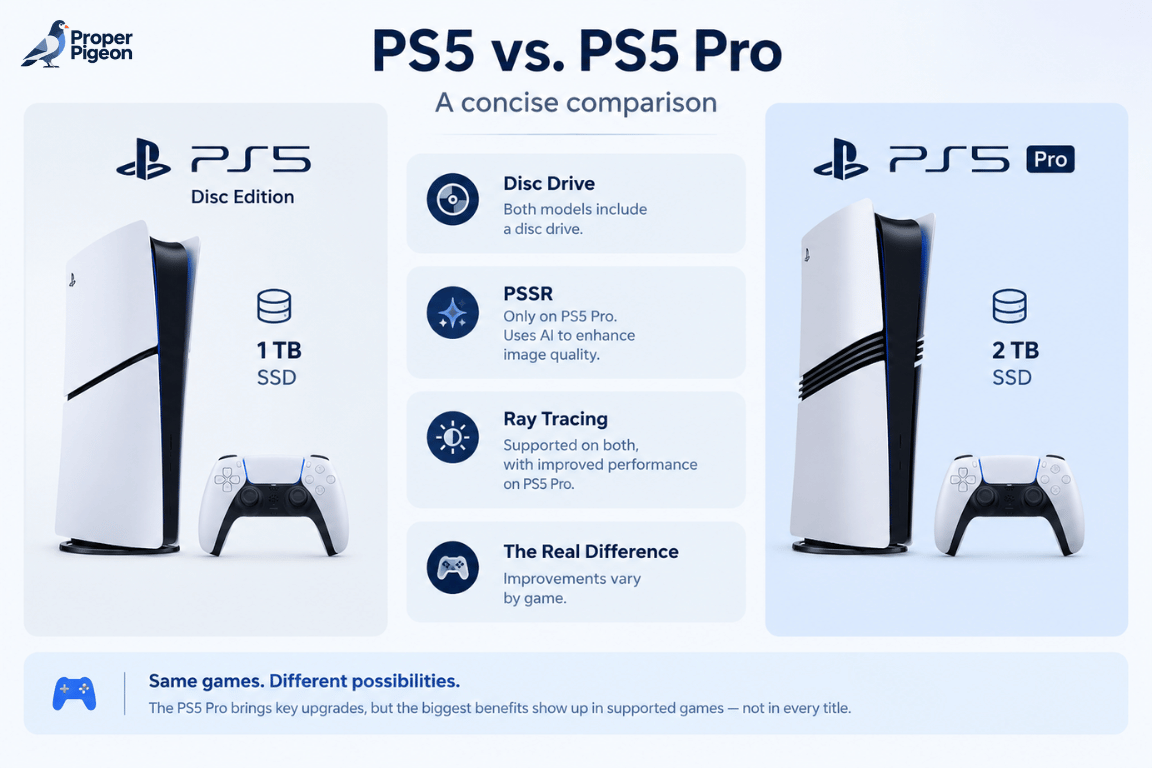
PS5 Pro vs PS5: Specs at a glance
This table focuses on practical differences rather than treating theoretical hardware numbers as a guarantee of in-game results. Features can vary by game, display, console revision, and system settings.
| Feature | PS5 | PS5 Pro |
|---|---|---|
| Game library | PS5 games and compatible PS4 games | Same core library, with enhancements in supported titles |
| Graphics hardware | Custom AMD-based GPU | More powerful GPU designed to improve rendering and visual quality |
| Upscaling | Game-dependent rendering and upscaling | PlayStation Spectral Super Resolution (PSSR) in supported games |
| Ray tracing | Supported in compatible games | Enhanced capabilities in supported games |
| Storage in the linked listing | 1TB SSD | 2TB SSD |
| Disc drive | Included — linked listing is the Disc Edition (model CFI-1215A01X) | Disc drive sold separately |
| High frame rates | Up to 120Hz output in compatible games and displays | Up to 120Hz output in compatible games and displays, with enhanced modes in some titles |
| Best fit | Value-focused players and most households | Players prioritizing image quality and supported performance upgrades |
Important: “Up to 120Hz” does not mean every game runs at 120 frames per second. The game must support the mode, and the display must support the required output. Check the exact standard PS5 model before comparing storage or disc-drive features.
What Do You Actually Gain With the PS5 Pro?
1. Sharper image quality with PSSR
PlayStation Spectral Super Resolution (PSSR) is Sony’s AI-assisted upscaling technology. In supported games, it can reconstruct a sharper-looking image from a lower internal rendering resolution. The goal is to improve visual clarity while preserving performance, rather than forcing players to choose as sharply between image quality and smoothness.
The result depends on the game’s implementation. Some upgrades are easy to notice on a large 4K display; others are more subtle, particularly when sitting farther from the screen or playing less visually demanding games.
2. More advanced ray tracing
Ray tracing simulates how light interacts with a scene to create effects such as reflections, shadows, and more realistic lighting. The PS5 Pro has more graphics capability for these effects, but developers decide where and how to use it. A game may offer better reflections, improved shadows, or a more detailed visual mode—not necessarily every effect at once.
3. A better balance between image quality and frame rate
On the standard PS5, some games ask you to choose between a graphics-focused mode and a performance-focused mode. On the Pro, selected games can deliver visual settings closer to quality mode while targeting a higher frame rate. That is one of the most meaningful potential upgrades, but it is not universal across the library.
Will You Notice the Difference on Your TV or Monitor?
Your display affects how visible the PS5 Pro’s improvements are. A good 4K screen can make fine detail easier to see, while 120Hz support and Variable Refresh Rate (VRR) can help you take advantage of compatible high-frame-rate modes. HDR quality, screen size, and viewing distance also influence what stands out. A 4K/120Hz display is not mandatory to benefit from the Pro, and not every game supports every feature.
OLED can make contrast and dark scenes stand out, but you do not need an OLED panel to enjoy the console. A quality LCD can still deliver a great gaming experience; the difference depends on the display and the game as well as the console.
If you’re also considering a display upgrade, read our guide to IPS vs. VA vs. OLED for gaming for a practical breakdown of contrast, motion clarity, and image quality.
PS5 Pro Enhanced games: where the difference matters
Look for games explicitly labeled PS5 Pro Enhanced. PlayStation’s catalog includes titles such as Marvel’s Spider-Man 2, Horizon Forbidden West, Gran Turismo 7, Resident Evil 4, and Final Fantasy VII Rebirth. The exact enhancements differ by game, and the catalog changes over time.
- Action and open-world games: Enhanced detail, lighting, reflections, or a better balance of visual quality and frame rate can make large environments more appealing.
- Racing games: Improved reflections and image clarity can be noticeable on cars, tracks, and glossy surfaces.
- Horror games: Lighting, shadows, and detailed environments can contribute to atmosphere, depending on the game’s update.
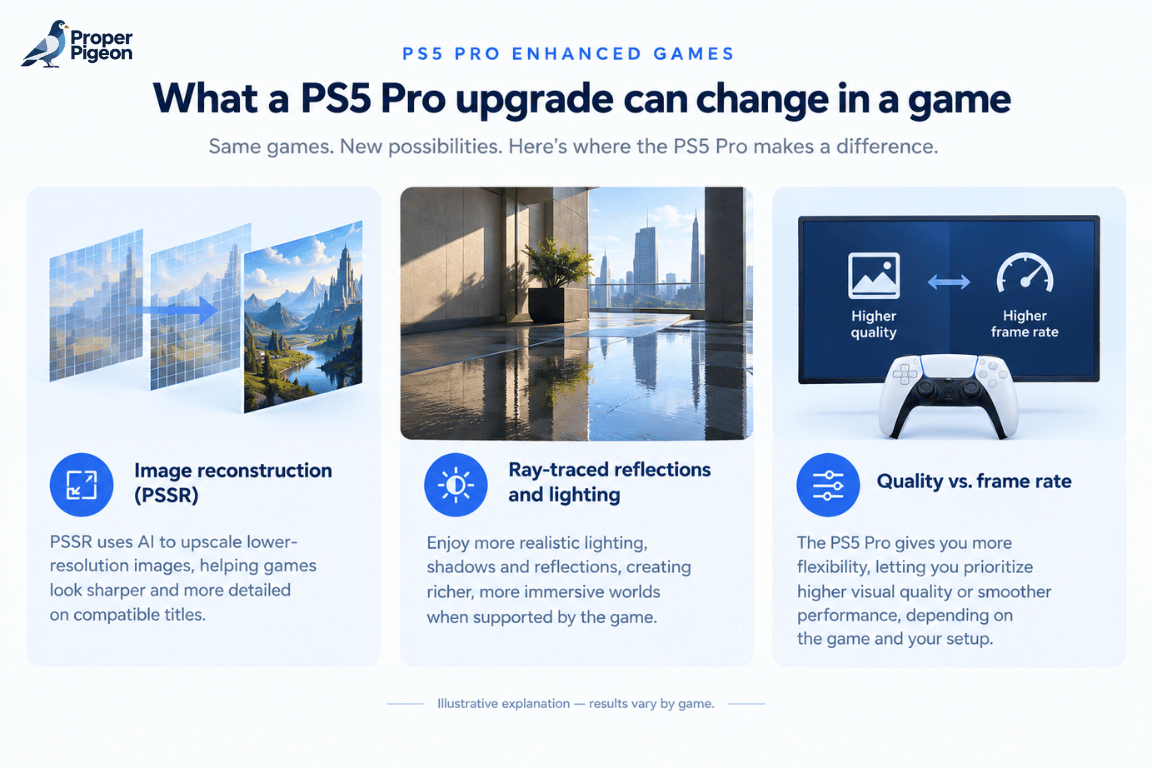
Examples from actual games: Sony has highlighted Horizon Forbidden West, whose PS5 Pro mode targets 60 FPS with image quality designed to rival or exceed the standard PS5’s Fidelity mode, and Ratchet & Clank: Rift Apart, which offers a Performance Pro mode combining visual features from Fidelity mode with a 60 FPS target. These are title-specific examples, not guarantees for every game.
Before buying a Pro specifically for one game, check the official PlayStation Store list of PS5 Pro Enhanced games and the game’s patch notes or graphics modes. A label alone does not tell you how large the improvement will be.
Storage, disc drives, and the real cost of upgrading
For the exact consoles linked in this guide, Amazon lists the standard PS5 Disc Edition (model CFI-1215A01X) with 1TB of storage and the PS5 Pro (model CFI-7119) with a 2TB SSD. That gives the Pro more listed built-in storage, but always recheck the product page in case the listing or selected variant changes.
The PS5 Pro does not include a disc drive. If you want to play physical PS5 or compatible PS4 games, you need to purchase a compatible drive separately. Factor that hardware into your decision if you own a collection of physical games.
- Already own physical games? Confirm disc-drive compatibility and the extra cost before choosing the Pro.
- Mostly buy digital games? The missing drive may not matter, but storage and your digital library still should.
- Running out of space? Compare the exact storage capacity of the standard PS5 listing with the Pro’s 2TB SSD.
Retailer prices, bundles, and availability change, so compare the current total cost rather than relying on a launch price or an old review.
Does the PS5 Pro Fix Lag or Improve Online Gaming?
Not by itself. More graphics power can improve visuals and performance in supported games, but it does not automatically lower ping, prevent packet loss, or fix a congested Wi-Fi connection. Online responsiveness depends on your home network, internet service, server location, and the route your traffic takes.
If you play competitive games and experience routing problems or packet loss, a network optimization service such as GearUP Booster may be worth investigating. Check the provider’s current console setup requirements before using it; support depends on the specific solution and compatible hardware, and results vary. It will not upgrade the PS5’s graphics.
Bottom line: Choose the Pro for supported graphics improvements—not as a solution for lag or a slow internet connection.
Family safety and parental controls: PS5 vs PS5 Pro
There is no meaningful Pro-specific safety advantage here. PlayStation family-management features are available on PS5 consoles, including the Pro. Parents and guardians can configure controls such as:
- Playtime limits: Set allowed play times and manage a child’s gaming schedule.
- Communication restrictions: Restrict messages, voice chat, and access to user-generated content, subject to game and account settings.
- Age ratings: Restrict games and apps based on age classifications.
- Monthly spending limits: Manage how much a child account can spend through PlayStation Store.
- Privacy settings: Manage selected interactions and what information a child can share.
These settings need to be configured for the child’s account; buying either console does not automatically apply every restriction. See Sony’s official parental controls and spending limits guide.
Should You Buy Your First PS5 or Upgrade to the Pro?
If you’re buying your first gaming console and haven’t settled on the PlayStation ecosystem, it may be worth comparing your options before making a decision. Our guide to PS5 Pro vs Xbox Series X: Which Console Should You Buy? compares graphics, performance, game libraries, storage, and overall value to help you choose the console that best fits your gaming preferences.
Choose the standard PS5 if…
- You want access to the PS5 game library at a more value-focused price.
- You are happy with the visual quality and performance offered by standard PS5 game modes.
- You play many games that do not have substantial Pro-specific enhancements.
- You would rather spend the difference on games, a second controller, a headset, or other accessories.
Choose the PS5 Pro if…
- You have a good 4K TV and are likely to notice improvements in clarity, lighting, and reflections.
- You regularly play games with meaningful PS5 Pro Enhanced modes.
- You prefer sharper visuals without giving up as much smoothness in supported games.
- You value the included 2TB SSD and are comfortable buying a compatible disc drive separately if needed.
What about competitive online players?
If your main priority is low latency in online shooters, the Pro is not automatically the better purchase for that reason alone. A stable wired Ethernet connection, a well-configured router, and a reliable internet route are more directly related to connection quality than the console’s graphics hardware.
Pros and cons
| Console | Advantages | Trade-offs |
|---|---|---|
| PS5 | Same core PS5 library; strong overall experience; model options include disc and digital editions | Less graphics headroom than the Pro; storage and disc features depend on the exact model |
| PS5 Pro | More powerful graphics hardware; PSSR and enhanced ray tracing in supported games; 2TB SSD | Higher purchase cost; benefits vary by game; disc drive sold separately |
Frequently asked questions
Is the PS5 Pro worth it over the PS5?
It can be worth it if you have a capable 4K display and regularly play titles with meaningful Pro enhancements. If you mainly want access to the PS5 library and are satisfied with standard performance modes, the regular PS5 is likely the more sensible choice.
Does the PS5 Pro run every game at 120 FPS?
No. Up to 120Hz output is supported in compatible setups, but frame rate depends on the game, its graphics mode, and the display. The Pro does not make every title run at 120 FPS.
Does the PS5 Pro have better graphics in every game?
No. Improvements depend on whether a game has been optimized for the Pro and how the developer uses the additional hardware. Some games show clear improvements; others may look similar.
Can I play physical PS5 games on the PS5 Pro?
Yes, with a compatible disc drive installed. The PS5 Pro does not include the drive, so owners of physical games should factor that separate purchase into the total cost.
Does the PS5 Pro reduce ping or lag?
No, not inherently. Graphics performance and network latency are different things. Ping and packet loss depend on the internet connection, router, network conditions, server, and route.
Are parental controls better on the PS5 Pro?
The Pro does not have a special parental-control advantage. Playtime limits, age restrictions, communication controls, and spending limits are available through PlayStation family-management tools on PS5.
Will I notice the PS5 Pro on a 4K/60Hz TV?
You may notice improved image quality in supported games even without a 120Hz display. However, 120Hz-specific modes require compatible games and a compatible display, and the size of the improvement varies by title.
Is OLED required to benefit from the PS5 Pro?
No. OLED can provide excellent contrast, but a quality LCD can still show improvements in supported games. Display quality, game support, screen size, and viewing distance all affect what you notice.
Should I upgrade from a standard PS5 to a PS5 Pro?
Consider upgrading if specific games you play often benefit from the Pro and you care about their visual improvements. If you are satisfied with your current experience, there is no need to upgrade just because the Pro is newer or more powerful.
Final Verdict: Better Graphics, or Just More Money?
The PS5 Pro makes the most sense when you can name the games you play that benefit from its enhancements, have a display that lets you appreciate those changes, and care about image quality enough to pay for it. For a first-time buyer who wants to play the same core PS5 library, the standard PS5 Disc Edition remains a compelling choice. For an existing PS5 owner who is already happy with performance and visuals, upgrading is optional—not a necessity.
Before deciding, check the games you actually play, confirm the console model and storage, and include the cost of a separate disc drive if you need one. Then compare the latest listings below.
PlayStation 5 Console (PS5)
Disc Edition with a disc drive and 1TB of storage listed by Amazon.
PlayStation 5 Pro
2TB SSD and enhanced graphics features in supported games; disc drive sold separately.